Embedding MkDocs documentation seamlessly into an Angular SaaS App
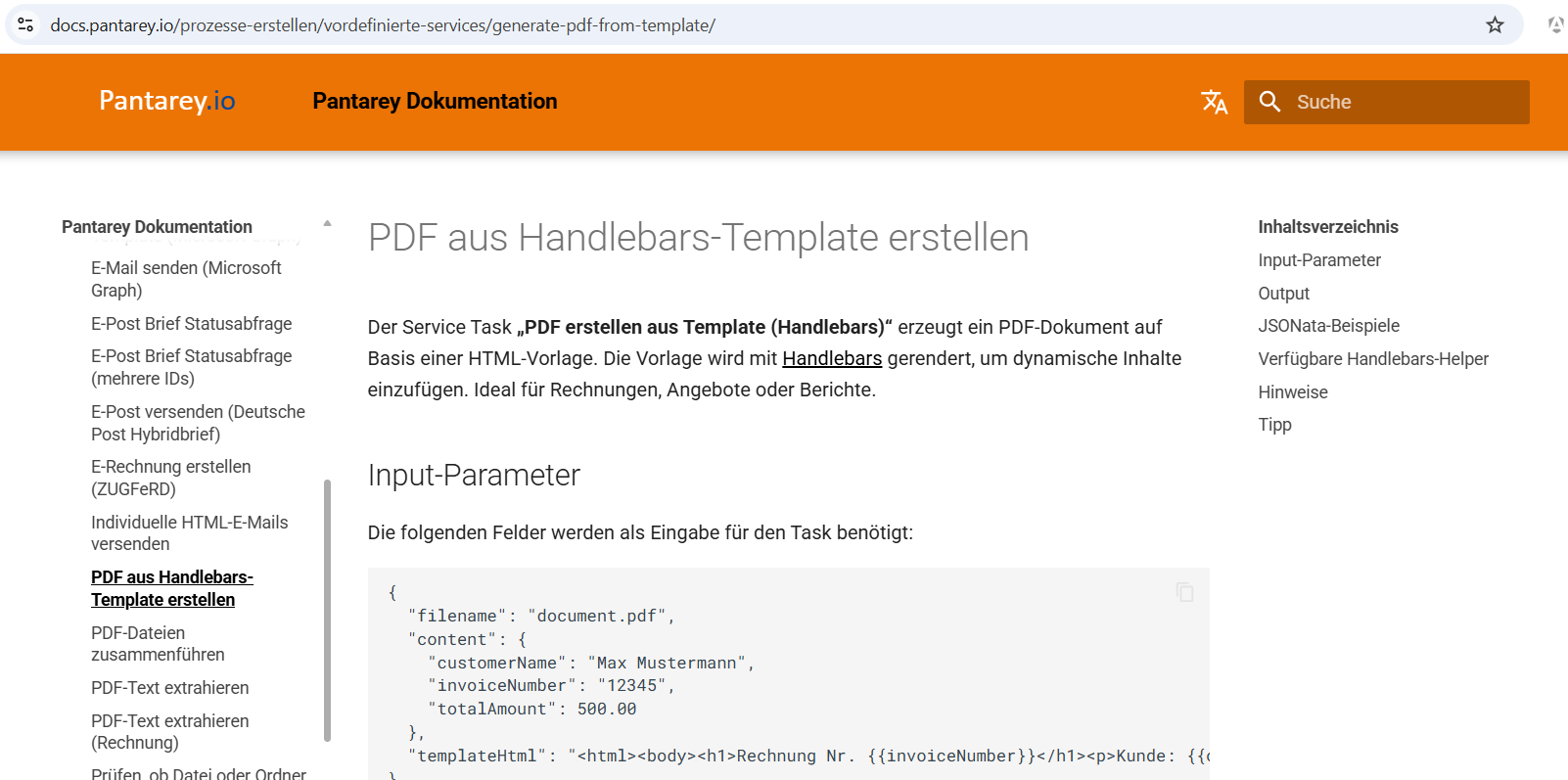
Most SaaS apps ship docs on a separate domain and call it a day. The problem: users leave the product and lose context. Also they have to search the correct entry within the documentation.
Why typical approaches fail
Linking out to docs is easy, but it breaks flow:
- Users lose the current screen and the UI state.
- Deep links become “open a new tab, search again”.
- Help buttons are useless if they eject the user from the product.
Copying docs into the app sounds tempting, but it quickly becomes a mess:
- Two render stacks (MkDocs + Angular) drift apart.
- Search, anchors, and navigation behave differently.
- SEO gets worse because pages are duplicated or altered.
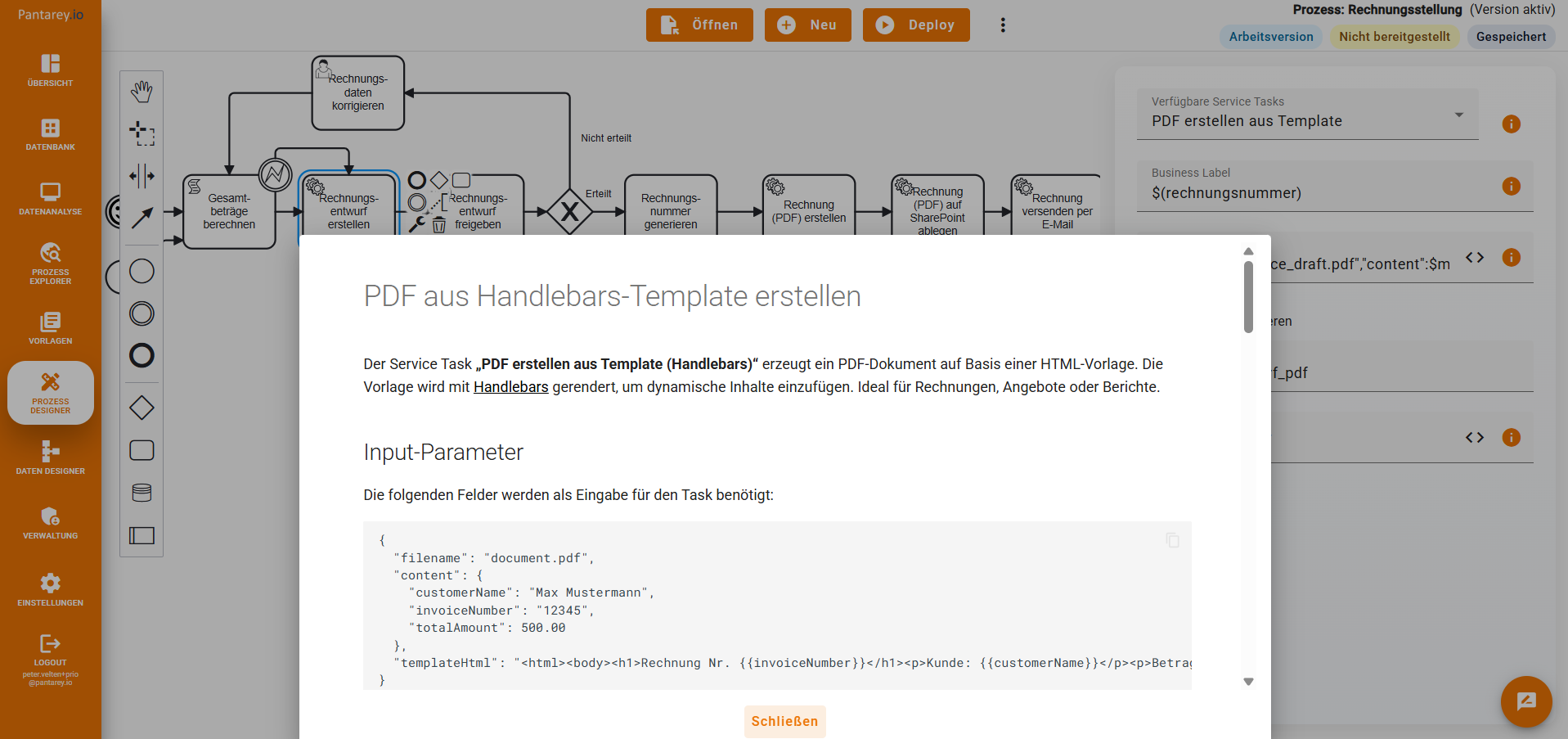
The sweet spot is a dedicated docs site with an embed mode, then embedding that mode into the app on demand.
Target architecture
- Docs live on
docs.pantarey.ioand are built with MkDocs + Material. - The Angular app embeds docs pages in a Bottom Sheet using an
<iframe>. - An embed flag (
?embed=1) switches MkDocs into a minimal chrome layout. - In embed mode, internal links keep the embed flag and preserve anchors.
This keeps docs as a real website (SEO, search, indexing) while giving the product a native help UX.
MkDocs: add an embed mode
1) Toggle embed mode via query param
Add a tiny script in the theme override so it runs early and adds a CSS hook class.
Create overrides/main.html (Material theme override) and include this in the <head> section:
<script>
  (function () {
    try {
      var params = new URLSearchParams(window.location.search);
      if (params.get('embed') === '1') {
        document.documentElement.classList.add('is-embed');
      }
    } catch (e) {
      // ignore
    }
  })();
</script>
If you already use a theme override, place it there. Otherwise, enable overrides in mkdocs.yml:
2) Hide header-stuff when embedded (CSS)
In Material, the easiest is a small CSS file that hides navigation elements when is-embed is active. Extend your stylesheet:
Create docs/stylesheets/extra.css:
/* Embed-Modus ----------------------------------------------------------- */
html.is-embed,
html.is-embed body {
  background: #fff;
  overflow-y: auto;
}

html.is-embed body {
  min-height: 100vh;
}

html.is-embed .md-header,
html.is-embed .md-sidebar,
html.is-embed .md-footer,
html.is-embed .md-tabs,
html.is-embed .md-top,
html.is-embed .md-overlay {
  display: none !important;
}

html.is-embed .md-main {
  margin: 0;
  padding-top: 0;
}

html.is-embed .md-main__inner {
  margin: 0;
  padding: 0;
  display: block;
}

html.is-embed .md-content {
  margin: 0;
  max-width: 100%;
  padding: 0;
}

html.is-embed .md-content__inner {
  margin: 0 auto;
  max-width: 960px;
  padding: 1.5rem 1.5rem 3rem;
}

html.is-embed .md-typeset > :first-child {
  margin-top: 0;
}

html.is-embed :target {
  scroll-margin-top: 1rem;
}
Reference it in mkdocs.yml:
3) Keep internal links embedded
In embed mode, you want all internal links to keep embed=1, including deep links with #anchors.
Add this script to the end of overrides/main.html (or any location after the page content is available):
<script>
  (function () {
    if (!document.documentElement.classList.contains('is-embed')) {
      return;
    }

    document.addEventListener('DOMContentLoaded', function () {
      var current = window.location;
      var anchors = document.querySelectorAll('a[href]');

      anchors.forEach(function (anchor) {
        var href = anchor.getAttribute('href');
        if (!href) return;
        if (href.indexOf('mailto:') === 0) return;
        if (href.indexOf('tel:') === 0) return;
        if (href.indexOf('#') === 0) return;

        try {
          var url = new URL(href, current.href);

          // Only rewrite same-origin links.
          if (url.origin !== current.origin) return;

          if (url.searchParams.get('embed') !== '1') {
            url.searchParams.set('embed', '1');
          }

          anchor.href = url.pathname + url.search + url.hash;
        } catch (error) {
          // Keep broken links as-is.
          console.warn('Embed link update failed', error);
        }
      });
    });
  })();
</script>
Angular: open docs in a Bottom Sheet
This pattern assumes:
- your docs are publicly reachable (or at least reachable for authenticated users)
1) A DocsUrlService (base URL + normalization)
import { Injectable } from '@angular/core';

@Injectable({ providedIn: 'root' })
export class DocsUrlService {
  // Use your docs host here. Keep it in environment config in real projects.
  private readonly baseUrl = 'https://docs.pantarey.io';

  resolve(pathOrUrl?: string): string | null {
    if (!pathOrUrl) return null;

    // Absolute URL stays as-is.
    if (pathOrUrl.startsWith('http://') || pathOrUrl.startsWith('https://')) {
      return pathOrUrl;
    }

    // Ensure a leading slash for relative paths.
    const path = pathOrUrl.startsWith('/') ? pathOrUrl : `/${pathOrUrl}`;
    return `${this.baseUrl}${path}`;
  }
}
2) A minimal HelpService (static map → URL → bottom sheet)
import { Injectable, inject } from '@angular/core';
import { MatBottomSheet } from '@angular/material/bottom-sheet';
import { DocsUrlService } from './docs-url.service';
import { HelpBottomSheetComponent } from './help-bottom-sheet.component';

interface HelpEntry {
  docsUrl: string;
}

type HelpSection = Record<string, HelpEntry>;

@Injectable({ providedIn: 'root' })
export class HelpService {
  private readonly bottomSheet = inject(MatBottomSheet);
  private readonly docsUrlService = inject(DocsUrlService);

  private readonly content: Record<string, HelpSection> = {
    serviceTasks: {
      sendEmailTemplateOffice: {
        docsUrl: '/processes/prebuilt-services/send-email-template-office/?embed=1'
      }
    },
    dataDesigner: {
      formExpressions: {
        docsUrl: '/data-modeling/form-expressions/?embed=1'
      }
    }
  };

  showHelp(section: string, key: string): void {
    const entry = this.content[section]?.[key];
    const docsUrl = this.docsUrlService.resolve(entry?.docsUrl);
    if (!docsUrl) return;

    this.bottomSheet.open(HelpBottomSheetComponent, {
      data: { docsUrl }
    });
  }
}
3) The Bottom Sheet component (iframe + loader)
import { Component, Inject } from '@angular/core';
import { MAT_BOTTOM_SHEET_DATA, MatBottomSheetRef } from '@angular/material/bottom-sheet';
import { DomSanitizer, SafeResourceUrl } from '@angular/platform-browser';

export interface HelpBottomSheetData {
  docsUrl: string;
}

@Component({
  selector: 'app-help-bottom-sheet',
  templateUrl: './help-bottom-sheet.component.html',
  styleUrls: ['./help-bottom-sheet.component.scss']
})
export class HelpBottomSheetComponent {
  docsUrl: SafeResourceUrl;
  isDocsLoading = true;

  constructor(
    @Inject(MAT_BOTTOM_SHEET_DATA) public data: HelpBottomSheetData,
    private readonly bottomSheetRef: MatBottomSheetRef<HelpBottomSheetComponent>,
    private readonly sanitizer: DomSanitizer
  ) {
    this.docsUrl = this.sanitizer.bypassSecurityTrustResourceUrl(data.docsUrl);
  }

  close(): void {
    this.bottomSheetRef.dismiss();
  }

  onDocsLoaded(): void {
    this.isDocsLoading = false;
  }
}
help-bottom-sheet.component.html:
<div class="help-container">
  <div class="docs-wrapper">
    <div class="docs-loader" *ngIf="isDocsLoading">
      <mat-progress-spinner diameter="40" mode="indeterminate"></mat-progress-spinner>
    </div>

    <iframe
      class="help-iframe"
      [src]="docsUrl"
      (load)="onDocsLoaded()"
      referrerpolicy="no-referrer"
    ></iframe>
  </div>

  <button mat-button (click)="close()">Close</button>
</div>
help-bottom-sheet.component.scss:
::ng-deep .mat-bottom-sheet-container {
  display: flex;
}

.help-container {
  display: flex;
  flex-direction: column;
  gap: 16px;
  width: 100%;
}

.docs-wrapper {
  position: relative;
  width: 100%;
  flex: 1 1 auto;
  min-height: 320px;
}

.help-iframe {
  width: 60vw;
  height: 60vh;      /* or your height */
  border: 0;
  display: block;    /* margin/width looks nicer */
}

.docs-loader {
  position: absolute;
  inset: 0;
  display: flex;
  align-items: center;
  justify-content: center;
  pointer-events: none;
}

.help-container button[mat-button] {
  align-self: center;   /* central within Flex-Layout */
  width: auto;          /* prevents 100 %-Breite */
}
4) A help button component
import { Component, Input, inject } from '@angular/core';
import { HelpService } from './help.service';

@Component({
  selector: 'app-help-button',
  template: `
    <button
      type="button"
      mat-icon-button
      aria-label="Help"
      (click)="openHelpSheet()"
    >
      <mat-icon>help_outline</mat-icon>
    </button>
  `
})
export class HelpButtonComponent {
  @Input() helpCategory!: string;
  @Input() helpKey!: string;

  private readonly helpService = inject(HelpService);

  openHelpSheet(): void {
    if (!this.helpCategory || !this.helpKey) return;
    this.helpService.showHelp(this.helpCategory, this.helpKey);
  }
}
iFrame considerations
Embedding docs with iframes is straightforward and that’s why it works.
Use an iframe when:
- docs are on a different domain
- you want Material search, anchors, and navigation “as-is”
- you want to keep docs build/deploy independent from the app
Avoid an iframe when:
- you need tight, two-way integration (events, state sync)
- your docs require authenticated requests that are hard to share cross-domain
- your security policy forbids framing entirely
For most SaaS help UIs, the iframe solution wins on maintenance and reliability.
Conclusion
The pattern is simple:
1) ship real docs (MkDocs)
2) add an embed mode
3) embed via bottom sheet for contextual help
4) keep links embedded and anchors intact
This gives you product-grade UX without sacrificing SEO or maintainability.
This pattern is also used internally at Pantarey to keep technical documentation accessible directly inside the SaaS UI. Documentation is always maintained at one single point of truth: