ngx-planning-board: An Open-Source Angular Resource Planning Board
Angular has no free component for a resource planning board: rows of people or rooms on the left, a time axis on top, absences and bookings as bars. FullCalendar keeps its resource views behind a premium license, Bryntum and DHTMLX are commercial with their own data models, and the free timeline libraries stopped evolving years ago. We needed one for the Pantarey dashboards, so we built it and released it under MIT.
Why the Existing Options Did Not Fit
A vacation planner looks simple until you write the requirements down. It needs half days that count as half a day but are drawn as half a cell. It needs part-time patterns, public holidays per state, and rooms that are blocked for renovation. It needs a manager to see at a glance on which day the team drops below two people, and it needs approved entries to refuse being dragged while requested ones may move. None of that is a date arithmetic problem. It is a data model problem.
Three decisions shaped @pantarey.io/ngx-planning-board:
Explicit over implicit. Every layer of entries declares its kind (span or point), its temporal mode (date or dateTime), whether ends are inclusive, and what an open end means. A missing field is reported in place of the board, not guessed. Half days are dayPart: 'am' | 'pm' plus a quantity for counting; the board never derives vacation days from drawn pixels.
The host computes, the board shows. Aggregates like "vacation days taken this year" belong to the data source. The board renders result columns from values the host provides and sums them to group totals when told to. It only derives what follows from the visible data: presence per day, headcounts, rule violations.
Zero UI dependencies. The package depends on @angular/core, @angular/common and @angular/cdk. No Material, no date library. Theming goes through CSS custom properties, so the board follows any design system without knowing it.
The Data Model
Rows, layers and entries are plain objects. Dates are ISO strings, spans are half-open.
import { PbAxis, PbEntry, PbLayer, PbRow } from '@pantarey.io/ngx-planning-board';

export const axis: PbAxis = {
  scale: 'day',
  start: '2026-10-01',
  end: '2027-01-01',
  timeZone: 'Europe/Berlin',
  locale: 'de-DE',
  showWeekNumbers: true,
};

export const rows: PbRow[] = [
  { id: 'anna', label: 'Anna Berger', sublabel: 'Account manager', avatar: {}, groupPath: [{ id: 'sales', label: 'Sales' }] },
  { id: 'ben', label: 'Ben Fischer', sublabel: 'Sales engineer', avatar: {}, groupPath: [{ id: 'sales', label: 'Sales' }] },
  { id: 'cara', label: 'Cara Huber', sublabel: 'Part-time 60 %', avatar: {}, groupPath: [{ id: 'sales', label: 'Sales' }], capacity: 0.6 },
];

export const layers: PbLayer[] = [
  { id: 'absence', label: 'Absences', kind: 'span', temporalMode: 'date', openEnd: 'none', colorBy: 'category' },
  { id: 'due', label: 'Due dates', kind: 'point', temporalMode: 'date', openEnd: 'none', colorBy: 'layer', color: '#3949ab' },
];

export const entries: PbEntry[] = [
  { id: 'v1', layerId: 'absence', rowId: 'anna', start: '2026-10-12', end: '2026-10-17', category: 'Vacation', status: 'Approved', quantity: { value: 5, unit: 'days' } },
  { id: 'v2', layerId: 'absence', rowId: 'cara', start: '2026-10-26', end: '2026-10-27', category: 'Vacation', status: 'Approved', dayPart: 'pm', quantity: { value: 0.5, unit: 'days' } },
  { id: 'v3', layerId: 'absence', rowId: 'ben', start: '2026-10-19', end: '2026-10-24', category: 'Vacation', status: 'Requested', linkRowId: 'cara' },
  { id: 'd1', layerId: 'due', rowId: 'ben', start: '2026-11-13', label: 'Certificate expires' },
];
The entry v1 covers 12 to 16 October. The entry v3 names Cara as substitute through linkRowId; the board warns when the substitute is absent herself.
Rendering the Board
import { Component } from '@angular/core';
import { PlanningBoard, PbEntryChangeEvent, PbRangeSelection } from '@pantarey.io/ngx-planning-board';
import { axis, entries, layers, rows } from './data';

@Component({
  selector: 'app-team-plan',
  imports: [PlanningBoard],
  template: `
    <pb-planning-board
      title="Team planning"
      [scales]="['day', 'week', 'month']"
      [axis]="axis"
      [rows]="rows"
      [layers]="layers"
      [entries]="entries"
      [styleRules]="[
        { field: 'category', value: 'Vacation', style: { color: '#2563eb', code: 'V' } },
        { field: 'status', value: 'Requested', style: { pattern: 'hatched' } },
      ]"
      [grouping]="{ enabled: true, collapsible: true, headerAggregate: 'count' }"
      [rules]="{ minPresence: { value: 2, unit: 'absolute', severity: 'warning' }, links: { severity: 'warning' } }"
      [totalsRow]="{ headcount: true, fte: true }"
      [editing]="{ move: true, resize: true, canEdit: canEdit }"
      [selection]="{ range: true }"
      [minimap]="true"
      height="560px"
      (scaleChange)="axis = { ...axis, scale: $event }"
      (entryMove)="save($event)"
      (entryResize)="save($event)"
      (rangeSelect)="request($event)"
    />
  `,
})
export class TeamPlanComponent {
  axis = axis;
  rows = rows;
  layers = layers;
  entries = entries;

  canEdit = (entry: { status?: string }) =>
    entry.status === 'Approved' ? 'Approved entries can only be changed through a process.' : true;

  save(change: PbEntryChangeEvent): void {
    this.entries = this.entries.map((e) =>
      e.id === change.entry.id ? { ...e, start: change.start, end: change.end, pending: true } : e,
    );
  }

  request(range: PbRangeSelection): void {
    console.log(`${range.row.label}: ${range.start} to ${range.end}, ${range.workdays} working days`);
  }
}
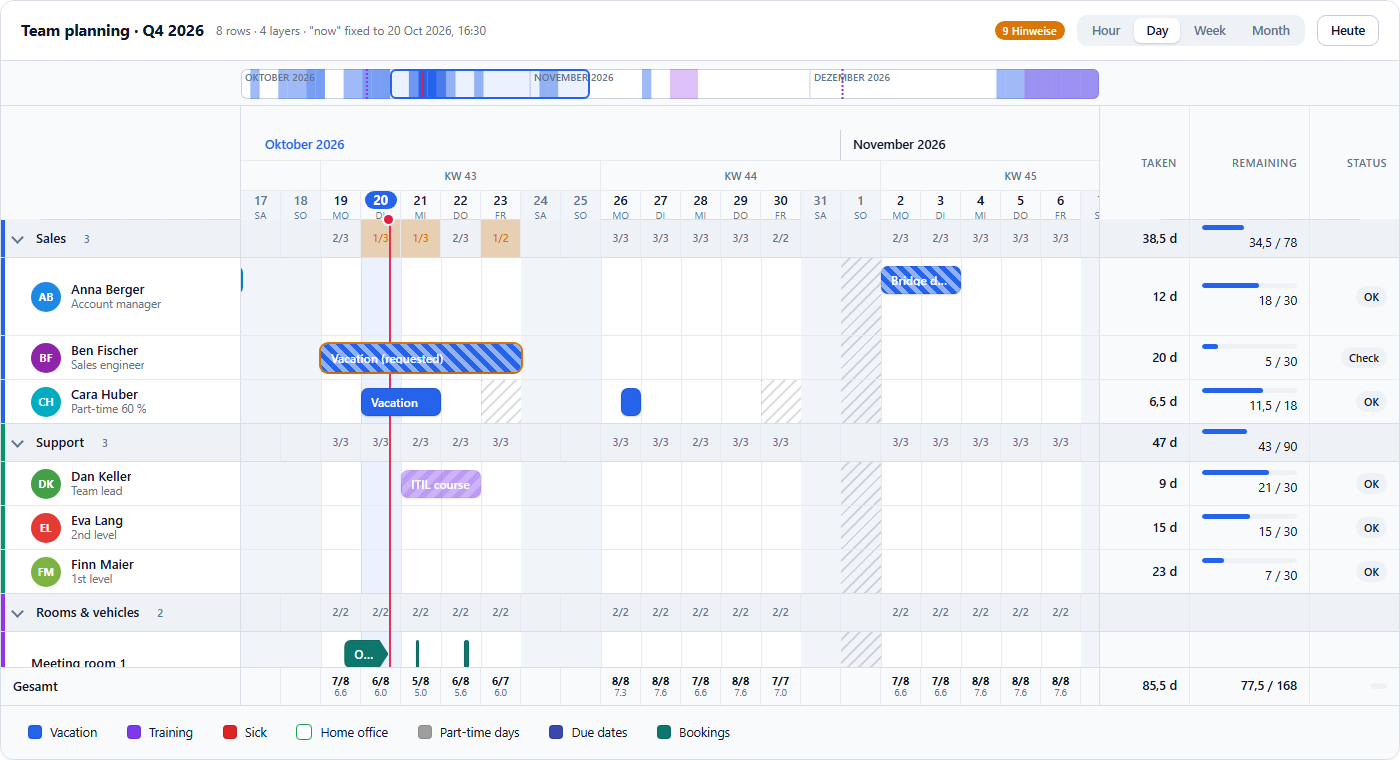
The board emits what happened; the host applies it. entryMove carries the new start and end in the layer's own format, so a date layer gets 2026-10-13, a dateTime layer gets 2026-10-13T08:00:00+02:00. Setting pending: true draws the bar with moving stripes until the backend confirms.
Presence and Rules Without a Backend Round Trip
Group rows show present / total per day. Presence is computed per row and working day as availability × (1 − effect) × capacity: an absence layer reduces presence by its capacityEffect, half days by half, timestamps by the fraction of the day they cover. The computation uses difference arrays, so it is linear in entries plus days. Two hundred rows across a full year with three entries each lay out in a few milliseconds.
Rules turn presence into issues with a severity and a sentence:
rules = {
  workdays: [1, 2, 3, 4, 5],
  minPresence: { value: 50, unit: 'percent', severity: 'warning', scope: 'group' },
  overlaps: { layerIds: ['absence'], severity: 'info' },
  links: { severity: 'warning' },
};
Issues mark the affected bars and group cells, the toolbar counts them, and issuesChange hands the list to the host. While a bar is being dragged, the board recomputes the row's presence with the ghost interval and shows the impact on the worst day at the pointer: "Sales on 21 Oct: 2 → 1 present".
Styling Without Coupling
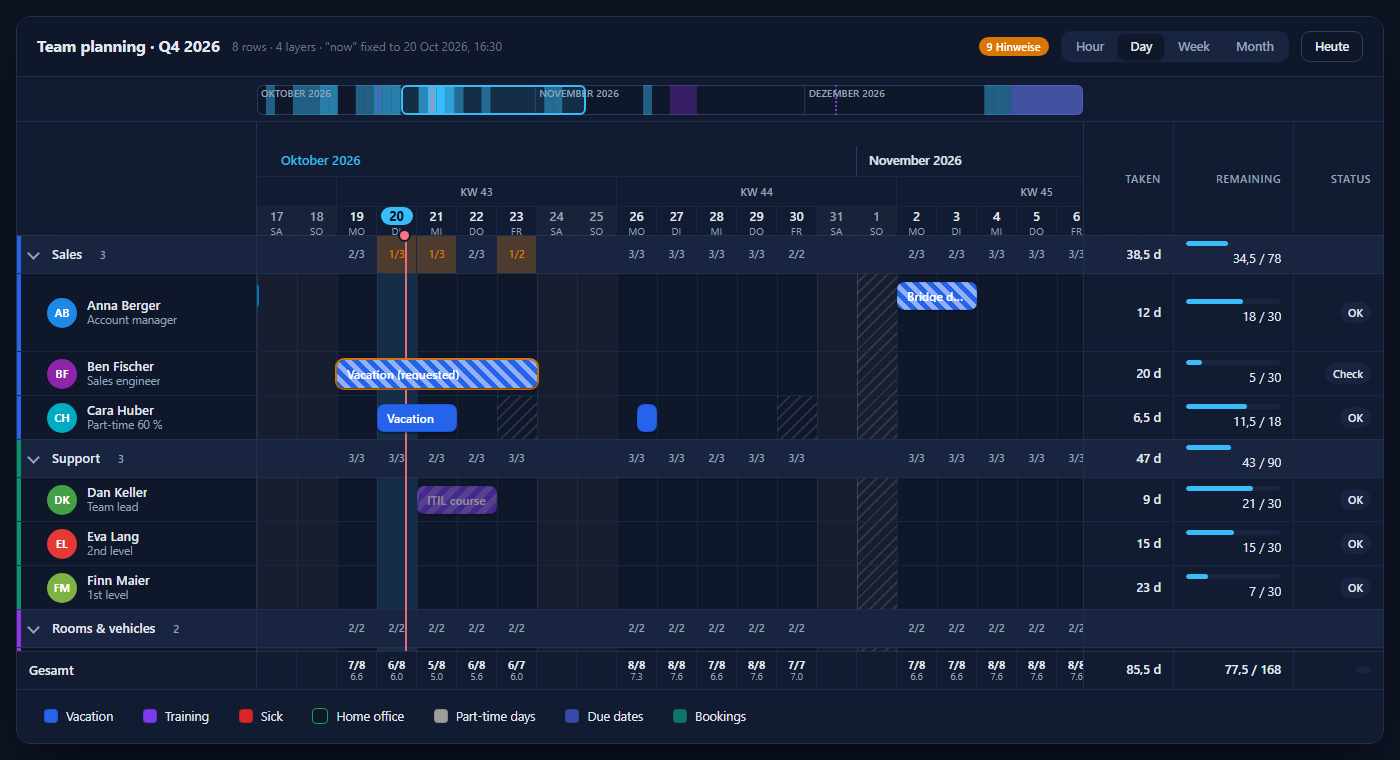
All visuals are CSS custom properties with defaults in the component. A preset is a handful of tokens:
A host theme drives the board by referencing its own variables:
<pb-planning-board [theme]="{ accent: 'var(--mat-sys-primary)', fontFamily: 'Roboto, sans-serif' }" … />
theme="auto" follows prefers-color-scheme. Slots replace the toolbar, the tooltip, the row header and the range popover with your own templates.
Performance Notes
- One layout pass per data change: columns, lanes, row heights and bar positions are computed in a single sweep over arrays.
- Rows are virtualised with heights known in advance, so the viewport is a prefix-sum lookup.
- Bars are positioned absolutely; weekends, holidays and grid lines are a few wide elements, never one node per cell.
- Scroll and drag handlers run outside the Angular zone and update signals once per animation frame.
Conclusion
A planning board is a data model with a renderer attached, not the other way round. Making every distinction explicit and leaving aggregation to the data source kept the library small, testable and independent of any UI framework beyond Angular itself.
The board is the base of the planning widget in Pantarey dashboards, where rows and entries come from SQL over the data lake and actions start processes. https://pantarey.io